

Calorie counter apps and the Apple Health app: what actually syncs
Lots of calorie apps say they work with the Apple Health app, but they don't all sync the same data, or in the same direction. Here's what to look for, how to set up permissions so the connection works, and what Foodify does with it.
What "syncs with Apple Health" can mean
On iPhone, plenty of apps can connect to the Apple Health app and say "connected", but that word hides real differences. Data can flow in two directions, and many apps only do one of them.
One direction is writing in: the app saves something to the Health app, such as dietary energy from your meals or a workout you finished. The other is reading back: the app pulls your active energy, steps and workouts out of the Health app, so the calories you eat are compared with what your iPhone or Apple Watch actually recorded, instead of a formula that assumes every day is average.
The read direction is the underrated one. Your daily burn swings a lot between a rest day and a long-walk day. If a calorie app can see what was recorded, your daily balance stops being a guess.
What to compare before you connect an app
Permissions and features change often, so check these inside the app and in the Health app rather than on a marketing page:
- Which data types it reads. Active energy, resting energy, steps, workouts, weight? Each one is a separate permission.
- Which data types it writes. Meals, water, workouts, weight? Writing is useful, but two apps writing the same thing creates duplicates.
- What you can log in the app. The sync is rarely the hard part. What differs is how fast you can log food: photo, barcode, search or saved meals.
- What it costs. Look at the full yearly price and which plan includes a trial.
How Foodify uses the Apple Health app
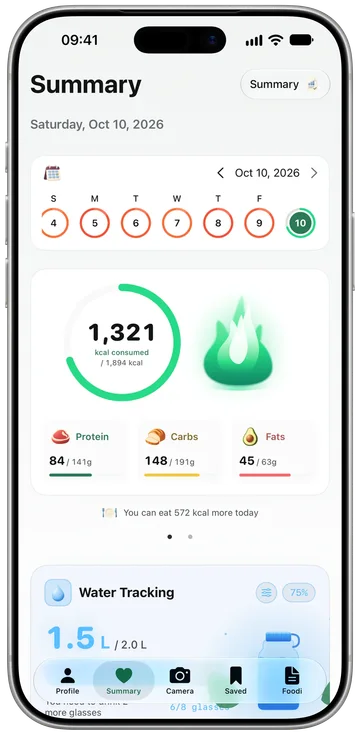
Foodify works mainly in the read direction. With your permission, it reads your activity and puts it next to what you ate, so you see calories in against calories out from real data. On a day you walked ten kilometers, the app knows. On a day you barely moved, it knows that too.
| Data | What Foodify does |
|---|---|
| Active energy and resting energy | Reads it, to balance calories in and out |
| Steps, walking and running distance, exercise minutes | Reads it, as part of your daily activity |
| Workouts you finish in Foodify | Can save them to the Health app, if you allow it |
| Meals, calories eaten and macros | Kept in Foodify; not written to the Health app |
| Water, weight and body measurements | Logged and charted in Foodify |
The logging side is built around speed. Point the camera at your plate and Foodify names each food, estimates the portion and lets you edit anything before saving, the workflow we cover in our guide to counting calories from a picture. There's also a barcode scanner for packaged food, plus weight, water and body measurement tracking in one place.
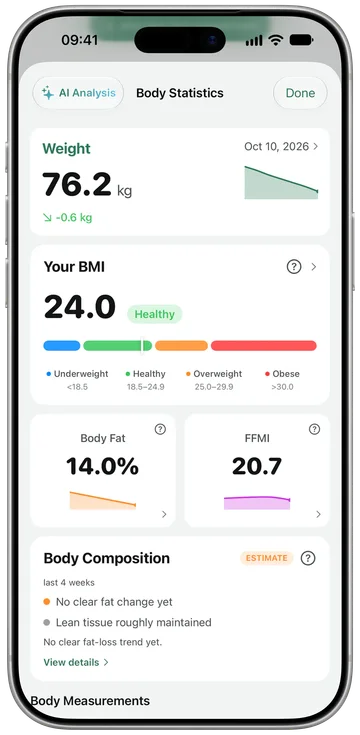
Foodify is free to download, and Foodify Pro is required to use the app: $49.99 a year with a 3-day free trial, or $12.99 a month (US prices; local prices vary).
Set up permissions correctly: the step everyone gets wrong
Almost every "my app won't sync" problem traces back to one moment: the iOS permission sheet. When a calorie app first asks for access, tapping Don't Allow, or approving only some categories, quietly breaks the sync, and iOS doesn't ask again. Here's the clean setup:
- When the app asks for Health access, review each category and turn on the ones you want it to use. Don't skim past the sheet.
- If you already declined, open the Health app → your profile picture → Apps (or Settings → Privacy & Security → Health), find your calorie app, and turn on the categories there.
- Check both lists: the categories the app may read and the ones it may write are separate switches.
- Open the calorie app once after changing permissions so it can do its first full sync.
Tip: let only one app write each data type to the Health app. If two apps both write workouts or steps, you can end up with inflated totals. Pick one source per category and turn off write access for the rest.
Why platform focus can matter
An app built for iPhone first can treat the Health app as its native data layer. Apps that also serve other platforms and the web have more systems to keep in step, so it's worth checking how carefully their Health connection behaves. That's not a rule. A well-built cross-platform app can sync cleanly and a careless iPhone app can sync badly, but if the Health app is the hub of your routine, how an app handles it is a fair thing to compare, next to logging speed and food coverage. For the wider picture, see our guide to choosing an AI calorie counter.
Troubleshooting: duplicates, missing workouts and priority order
Duplicate calories or steps. This happens when two sources report the same activity, such as your Apple Watch and your iPhone, or two apps writing the same workout. Open the Health app, tap a data type like Steps, then Data Sources & Access. The Health app uses this priority list to decide which source wins when data overlaps, so drag your most trusted source to the top.
Missing workouts. Usually a permission gap: the calorie app was allowed to read active energy but not workouts. Fix it in the Health app's per-app permission screen, then reopen the calorie app.
Numbers that don't match between apps. Apps read the Health app at different moments, and your totals keep updating as data arrives from your watch. Compare end-of-day totals, not mid-afternoon snapshots, before deciding something is broken.
One thing sync can't fix: portion sizes. The Health app stores whatever your app writes, so a wrong portion stays wrong. If weighing every meal isn't realistic for you, our guide to counting calories without a food scale covers estimation methods that keep logging honest. For packaged food, a scan is quicker; see calorie apps with a barcode scanner.
FAQ
Can the Apple Health app count calories by itself?
Only the calories you burn. The Health app records active and resting energy, especially with an Apple Watch, but it isn't built for logging food. For the eating side you need a calorie app, and if it reads your activity from the Health app, it can compare both.
How much does Foodify cost?
Foodify is free to download, and Foodify Pro is required to use the app. In the US, Pro is $49.99 a year with a 3-day free trial, or $12.99 a month with no trial. The App Store shows your local price before you buy.
Why is my calorie app not showing up in the Health app?
Almost always permissions. Open the Health app, tap your profile picture, then Apps, select the calorie app and check that the categories you want are turned on. If the app isn't in that list at all, it never asked for access; open the app and look for its Health or Apple Health setting.
Does Foodify write my meals to the Apple Health app?
No. Foodify reads your activity (like steps, distance and active energy) to balance calories in and out, and if you allow it, it saves the workouts you finish in Foodify. Your meals, water, weight and body measurements are tracked inside Foodify itself.