

Calorie counter apps with a barcode scanner (and photo logging too)
Scanning a barcode is the fastest way to log packaged food. Here's how it works, what to check in any app before you rely on it, and what to do about the meals that never had a barcode.
The short answer: a barcode scan is the most exact log you'll get
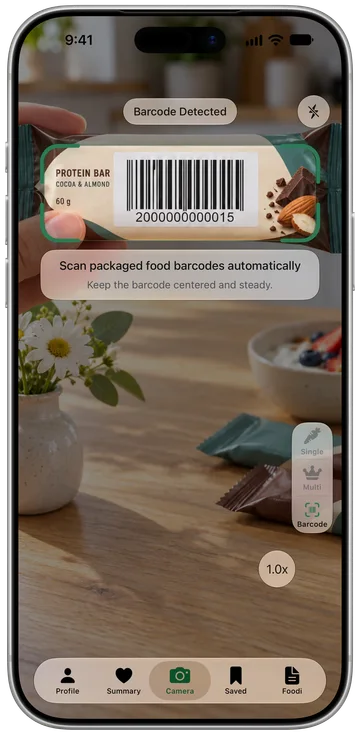
A calorie counter app with a barcode scanner turns a packaged food into a log entry in seconds. You point the camera at the barcode, the app looks the product up in a food database, and the nutrition facts fill in. Because the numbers come from the product's own label data rather than a visual estimate, a barcode scan is usually the most exact entry in your whole food log.
Foodify, our AI calorie counter for iPhone, includes a barcode scanner that pulls nutrition facts from the Open Food Facts database, plus photo logging for everything without a barcode. Foodify is free to download, and Foodify Pro is required to use the app.
How barcode lookups work
The barcode itself holds no nutrition data. It is a product number. The app sends that number to a food database and gets back whatever that database knows about the product: name, serving size and nutrition per serving or per 100 g. That has two consequences worth knowing:
- Coverage depends on the database. Big international brands are usually there; small local brands, store brands and brand-new products may not be.
- Entries can be wrong or out of date. Recipes change and databases lag behind. If a result looks off, compare it with the label in your hand.
What to check before you rely on any app's scanner
Before you build your logging habit around a barcode scanner, test it in the app itself rather than trusting a feature list:
- Scan three real products from your own kitchen, including one store brand. That tells you more about coverage than any marketing page.
- Check what happens when a product isn't found. Can you search by name instead, or add the food yourself?
- Check the serving. Does the app let you log a different amount than one serving, like half a bag or two bars?
- Read the plan and trial terms. Look at the yearly total, which plan has a trial, and how to cancel before it renews.
Getting accurate numbers from a barcode scan
A barcode gets the product right. Logging the right amount is still on you:
| Common mistake | What happens | Fix |
|---|---|---|
| Logging one serving when you ate more | A bag listed as "2.5 servings" gets logged as one | Check servings per package and log what you actually ate |
| Mixing "as sold" and "as prepared" | Dry pasta or oats logged with cooked weights, or the reverse | Match the label's basis to how you measured |
| Trusting an odd entry | A database typo slips into your day | Glance at the calories and compare with the label |
| Scanning the multipack | The outer box has a different code than the single item | Scan the item you're eating |
Beyond barcodes: logging the whole plate from a photo
Barcodes only cover packaged food. The moment you cook dinner or eat at a restaurant, there is nothing to scan, and you're back to searching and guessing. That's why newer trackers treat the camera as the main input for all food. Our guide to choosing an AI calorie counter covers what to compare.
Foodify is our app, so judge this section accordingly, but the idea is simple. Scan the barcode on packaged food, and for everything else photograph the plate. A single food is recognized right on your iPhone; for a plate with several foods, Foodify's AI names each one, estimates its portion and drafts calories, protein, carbs and fat. Every result is editable before you save it, which matters because no photo estimate is gram-perfect. Our guide to counting calories from a picture covers realistic expectations.
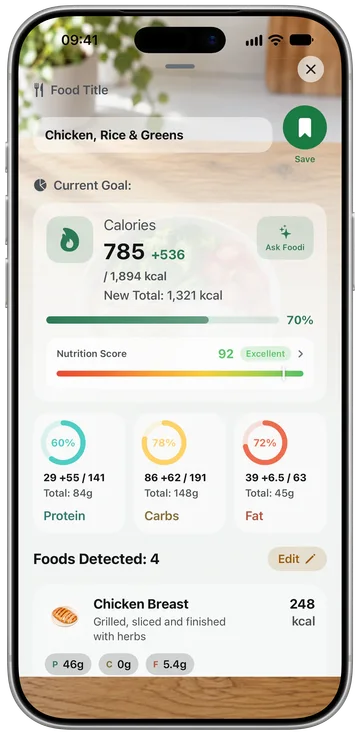
Around the scanners sits the rest of a full tracker: calories and macros against personal targets, personalized meal plans, a Nutrition Score from 0 to 100 for each meal, water, weight and body tracking, saved meals, logging streaks, a daily summary and weekly analysis, Foodi the AI coach, and workouts. It reads activity like steps and active energy from the Apple Health app, and it's available in 8 languages. Foodify Pro is $49.99 a year with a 3-day free trial, or $12.99 a month (US prices; local prices vary). One caveat: it's iPhone only (iOS 17.6 or later).
Switching calorie trackers without losing your footing
Calorie apps generally don't import each other's diaries, so plan around three things:
- Export what you can first. Check your current app's settings for a data download before you cancel anything.
- Keep what you'll actually reuse. Months of diary entries feel precious, but what you reuse is small: your calorie target, your recent weigh-ins and the handful of meals you eat on repeat. Note those down.
- Rebuild your repeat meals in week one. Log your usual breakfasts and dinners once, save them, and daily logging gets fast again quickly.
Tip: whichever app you choose, test the features that matter to you (scan three barcodes and log one home-cooked meal) on day one, before a trial ends. Your own two-minute test is the only review that's always current.
FAQ
Does Foodify have a barcode scanner?
Yes. Scan a packaged food's barcode and Foodify pulls the nutrition facts from the Open Food Facts database. Coverage depends on that database, so you can also search foods by name. Foodify is free to download, and Foodify Pro is required to use the app, including the scanner.
Is a barcode scan more accurate than a photo?
For packaged food, yes. A barcode pulls the product's label data, while a photo has to estimate. Use the barcode for anything with a label and the camera for food on a plate.
What if a product isn't found when I scan it?
Food databases don't cover every product, especially small local brands and new releases. Search for the food by name instead, or pick the closest match and check its calories against the label.
Can I transfer my logging history to a new calorie app?
There's usually no one-tap transfer between trackers. Export your data from your old app if you want a copy, note your recent weigh-ins and targets, and rebuild your saved meals in the new app. For most people that takes a few days of normal logging. Our guide to switching AI calorie apps has a checklist.