

Looking for an AI calorie app alternative? Questions to ask first
If your current photo-scanning app isn't working for you, whether it's the price, the paywall or the scans themselves, you're not the only one looking around. Here's what to check in any alternative before you switch, and what changes if you switch to Foodify.
Why people look for an AI calorie app alternative
People rarely switch calorie apps because of the camera; most photo-scanning apps can recognize a plate of food. They switch because of pricing that's hard to pin down, paywalls that feel more like a maze than a choice, scans that are slow to correct, or features they relied on moving to a different plan.
Whatever your reason, the fix is the same: decide what you actually need, then check it in the new app on day one instead of trusting a feature list. Our guide to calorie apps with a barcode scanner covers the same process for packaged food.
Questions worth asking any AI calorie app
Before you switch, it helps to know what good looks like, so you can spot when an app is doing something unusual. For a broader tour, see our guide to choosing an AI calorie counter.
| Question | What a good answer looks like | Foodify |
|---|---|---|
| What does it cost per year, all in? | A clear yearly price on the paywall, before you start a trial | $49.99 a year with a 3-day free trial, or $12.99 a month (US) |
| What can I do without paying? | A straight answer before you sign up | Free to download; Foodify Pro is required to use the app |
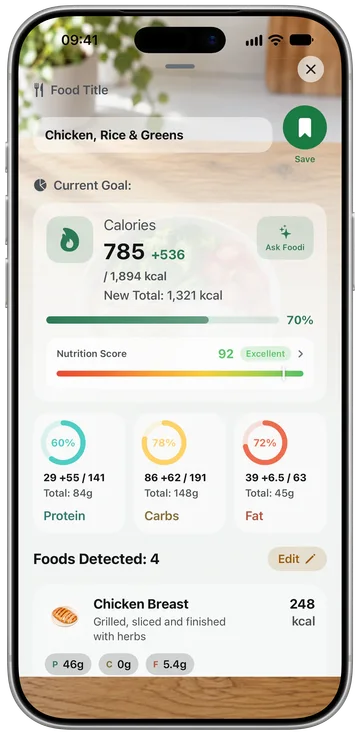
| Does a plate get split into foods? | Each food gets its own line and portion estimate | Yes, each food on the plate is listed separately |
| Can I correct an estimate before saving? | Any food or portion can be changed in a couple of taps | Yes, everything is editable before saving |
| What about packaged food? | A barcode scanner and a food search | Barcode scanner (Open Food Facts) and typo-tolerant search |
| How do I cancel? | In your iPhone's subscription settings, with no extra steps | Settings → your name → Subscriptions |
One honesty note that applies to every app in this category, including ours: a photo estimate is a starting point, not a lab measurement. Estimates do best on clearly visible foods and get worse on mixed dishes, hidden oils and ambiguous portions. That's why editable results matter more than accuracy marketing when you compare alternatives. We go into it in our guide to AI calorie counter accuracy.
Tip: before subscribing anywhere, work out the yearly total. A small weekly number, multiplied by 52, often adds up to more than a yearly plan. The yearly price is the honest number to compare.
What switching to Foodify actually changes
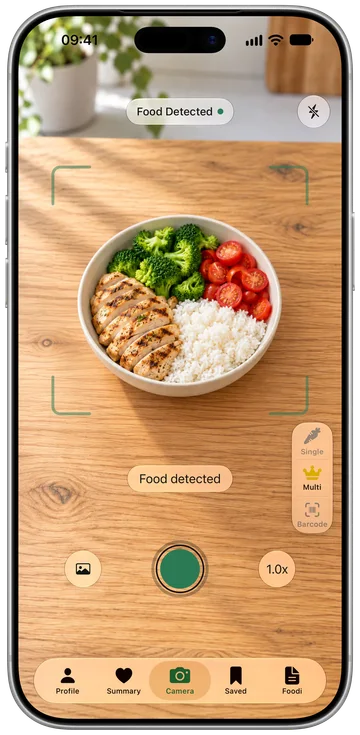
Foodify is built around the same "point the camera, get calories" habit that made this kind of app popular, with a few deliberate choices.
- Each food on its own line. One photo of chicken, rice and salad comes back as separate foods with their own portion estimates, not one blended guess. Our guide to counting calories from a picture explains why that matters for mixed plates.
- Everything is editable. Any food or portion can be corrected before you save it, the fastest fix for the limits every photo-scanning app shares.
- Barcode for packaged food. Packaged foods use the product's label data from Open Food Facts instead of a camera estimate.
- Published pricing. Foodify Pro is $49.99 a year with a 3-day free trial, or $12.99 a month (US prices; your local price is shown in the App Store), and you cancel anytime in your iPhone's Settings.
- Beyond the scan. Foodi, the AI coach, answers nutrition questions in chat; meal plans follow your goal, diet style, allergies and the foods you skip; and Foodify reads your activity from the Apple Health app so you see calories in against calories out.
Fair warning on fit: Foodify is iPhone only (iOS 17.6 or later) and comes in 8 languages. If you're on Android, you'll need a different tracker.
How to switch calorie apps without losing your streak
Streaks don't transfer between calorie apps. But the habit behind the streak transfers fine if you switch deliberately:
- Screenshot your targets. Save your current calorie and macro goals so you can compare them with what the new app suggests.
- Note your recent weigh-ins. Write down your last few weights and dates so your trend doesn't start from zero in the new app.
- Overlap for two or three days. Log the same meals in both apps and compare the estimates before you commit.
- Rebuild your saved meals early. Scan your five most repeated meals in week one and save them, so daily logging stays fast.
- Cancel the right way. If you subscribed through Apple, cancel in Settings → your name → Subscriptions. If you paid through a checkout outside Apple's system, cancel directly with that company; deleting the app isn't enough.
Then start your new day one the same day you cancel, not "next Monday." A streak was only ever a stand-in for consistency, and consistency is the part you keep.
FAQ
Why might two people see different prices for the same app?
App Store prices differ by country, and some apps also test different offers. The price a friend mentions may not be the one you're offered, so always check the number on your own screen and compare yearly totals.
Can I transfer my food log to a different calorie app?
Usually not directly. Food history generally stays in the old app, so most people switching note their targets and recent weigh-ins and rebuild their saved meals in the first week.
What does Foodify cost?
Foodify is free to download, and Foodify Pro is required to use the app. In the US, Pro is $49.99 a year with a 3-day free trial, or $12.99 a month with no trial. Pro covers photo and plate scans, barcode scanning, Foodi, meal plans, workouts and reports.
How do I cancel a subscription bought through the App Store?
Open Settings on your iPhone, tap your name, then Subscriptions, and choose the app. To avoid a charge after a free trial, cancel at least 24 hours before it ends.