

Choosing the best AI calorie counter: what to compare
Photo food logging is everywhere now, and an App Store search turns up a dozen look-alike scanners. This guide covers what actually separates them (portion estimates, plates with several foods, quick edits and clear pricing) so you can choose on substance instead of downloading six apps to find out.
The short answer: five things decide it
A good AI calorie counter isn't defined by its camera animation. It comes down to five things: how well the app estimates portion size, whether it can separate several foods on one plate, how easy it is to correct a wrong estimate, whether the price is clear before you commit, and whether the rest of the app (targets, history, coaching) helps you keep going. Judge any app, including Foodify, against that checklist rather than a logo.
| What to check | Why it matters | How to test it |
|---|---|---|
| Portion estimates you can see | Portion size is where most calorie error comes from | Scan a plate and look for an editable amount for each food, not just a name |
| Several foods on one plate | Real plates hold rice, protein and vegetables at once | Scan a mixed plate and see whether each food gets its own line |
| Fast corrections | No estimate is perfect, so fixing one must be quick | Change one portion and see how many taps it takes |
| Clear pricing | The yearly total is the number you'll actually pay | Check which plan has a trial, the yearly price and how to cancel |
| What happens after logging | Targets, trends and feedback keep you going | Look for daily totals against targets and a weekly view |
Pricing and plans change often across the category, so check the current App Store listing and the app's own paywall before you subscribe to anything.
What actually matters in an AI calorie app
Every AI calorie app can recognize a banana. The real differences show up in three places, not in the food-recognition demo:
- Portion estimation. Knowing what you're eating is the easy part; judging how much is where calorie errors come from. Look for apps that show an editable gram or serving amount, not just a food name.
- Several foods per plate. An app that logs "mixed plate, 600 kcal" as one blob is much less useful than one that lists each food, so you can correct one item without redoing the meal.
- Editability. No AI gets every meal right, and portion size is the weak spot (we explain why in our guide to how accurate AI calorie counters are). The winning workflow is scan, glance, fix one number, save. If editing is buried, small errors pile up.
Pricing: what to look at before you pay
Subscription pricing in this category deserves a careful look. Compare the yearly total rather than a weekly or monthly figure, check which plan comes with a free trial and how long it lasts, and note how to cancel before it renews. Prices can also differ by country, so the number on your own screen is the one that counts.
Foodify's pricing is published: the app is free to download, and Foodify Pro is required to use it. In the US, Pro is $49.99 a year with a 3-day free trial, or $12.99 a month with no trial, and you can cancel anytime in your iPhone's Settings. If you're weighing a switch, our guide to questions worth asking any AI calorie app walks through what to check.
Three common types of AI calorie apps
Most apps in this category fall into one of three types. Knowing which one you're looking at tells you more than any feature list.
Photo-first apps
Built around one loop (open the camera, snap the plate, get a number), these apps are fast and focused. Check how they handle plates with several foods and how quickly you can correct an estimate.
Big-database trackers
These lead with a large searchable food and barcode catalog, with AI photo scanning added later. If you mostly log by searching and scanning barcodes and want AI as a shortcut for the odd home-cooked meal, this type fits. If barcode logging is your main need, see our guide to calorie apps with a barcode scanner.
Coaching-heavy apps
This group leans on chat-based guidance, check-ins and habit coaching, with food logging as one input among several. They suit people who want to be told what to change, not just handed a calorie total.
How Foodify approaches each of these
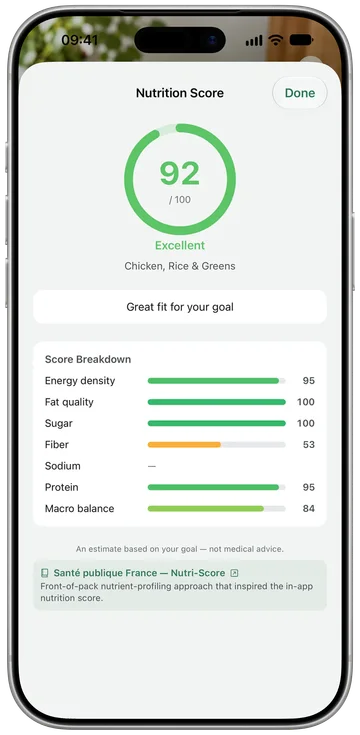
Foodify, for iPhone (iOS 17.6 or later), tries to cover all three types rather than pick one. The core loop is photo-first: photograph a plate, get each food listed with an editable portion estimate, adjust anything, save. Each meal gets a Nutrition Score from 0 to 100, and calories plus protein, carbs and fat count against your personal targets. On the database side there's a barcode scanner, food search and saved meals, so repeat meals log in one tap. On the coaching side, Foodi, the AI coach, answers questions in chat or about a photo, alongside a daily summary, a weekly analysis, a weekly Body Report, water, weight and body tracking, workouts, and activity read from the Apple Health app.
It's available in 8 languages. The main limitation is that it's iPhone only.
Where every AI calorie counter still gets things wrong
None of these apps is a lab instrument. Across the category, naming the food has become good, while portion size and anything invisible (cooking oil, butter, sugar in a sauce) drive most of the error. No app can see the tablespoon of olive oil the kitchen used.
That's why editability is the feature to shop for. An app that's a little further off but lets you fix the estimate in five seconds beats a slightly closer app that locks you into its number. It's also why a photo scan beats logging nothing at all: for most people, the realistic alternative to an imperfect estimate isn't a food scale, it's not logging.
Tip: treat every AI scan as a first draft. Pick the app that makes the correction loop fastest: tap the food, nudge the portion, save. Consistent, slightly imperfect logging beats occasional perfect logging.
Which type of app is right for you?
There's no single best AI calorie counter for everyone. It depends on what you're optimizing for.
Budget-first: compare yearly totals, check what the trial includes, and make sure the features you need (photo, barcode, targets) are in the plan you're paying for.
Accuracy-first: favor apps that list each food separately and make editing fast over any single accuracy claim, and pair your app with the Apple Health app so your activity keeps targets realistic. Foodify lists each food on a plate and reads your activity from the Health app.
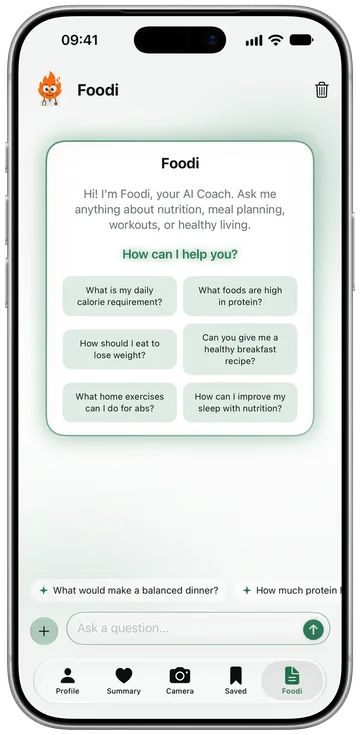
Coaching-first: if you want the app to tell you what to change, not just count, look for coaching built into the app rather than a separate chatbot. Foodi answers questions in chat, takes photos, and works alongside the daily summary, weekly analysis and personalized meal plans.
Whichever type you choose, give it two weeks before judging. The best AI calorie counter is the one you're still opening months from now.
FAQ
What's the best AI calorie counter app?
There's no single winner for everyone. It depends on whether you care most about budget, accuracy or coaching. Foodify suits iPhone users who want photo scanning that lists each food separately with editable results, plus barcode scanning and an AI coach in one app. Apps built around a large food database suit people who mostly log by search and barcode; coaching-heavy apps suit people who want guidance, not just a number.
Are AI calorie counter apps accurate?
They're good at naming foods and rougher at portion sizes, and they miss fats and sauces they can't see. Used as an editable first draft rather than a final answer, they're useful for day-to-day tracking, and much better than not logging.
How much does Foodify cost?
Foodify is free to download, and Foodify Pro is required to use the app. In the US, Pro is $49.99 a year with a 3-day free trial, or $12.99 a month with no trial. The App Store shows your local price before you buy.
Can AI count calories from a photo of a mixed plate?
Yes, if the app can list several foods on one plate. It will give the rice, protein and vegetables their own lines with their own portion estimates. Estimates get rougher on blended dishes like curries and casseroles, so pick an app that lets you correct each food before saving.